
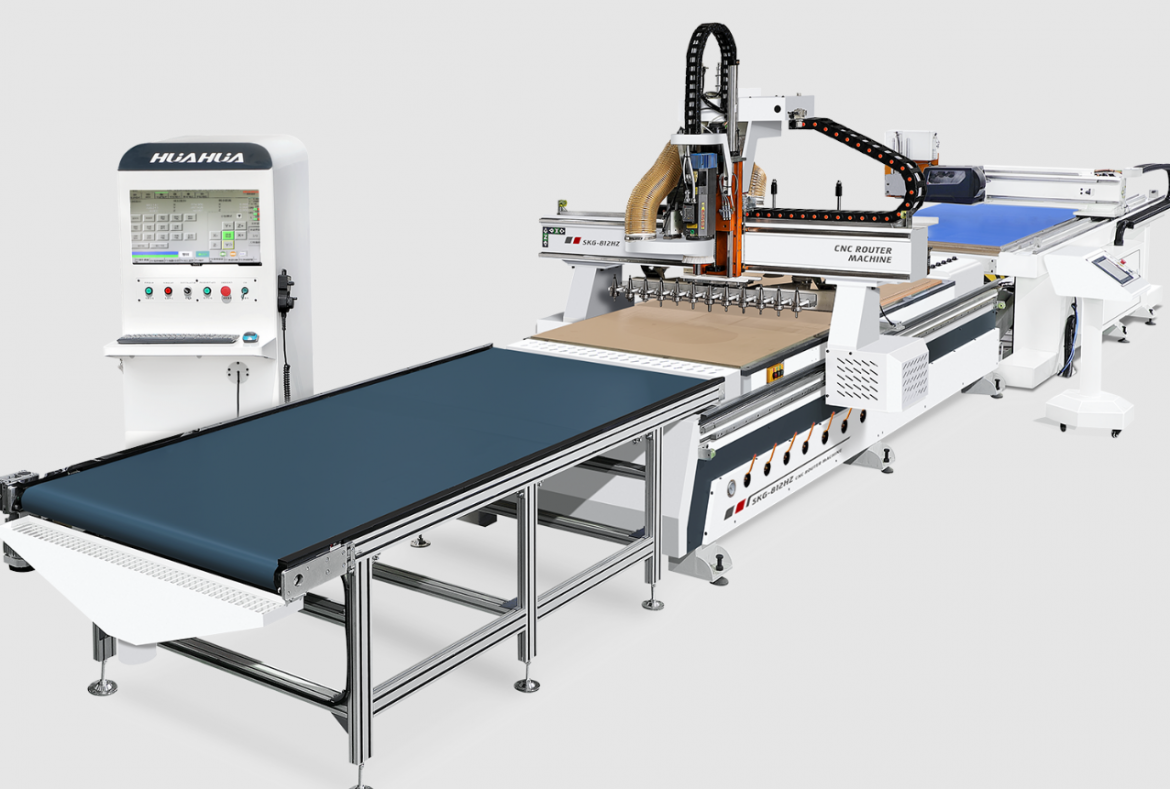
The advent of the CNC wood router has revolutionized woodworking by combining digital precision with mechanical efficiency. This technology allows artisans and manufacturers alike to achieve intricate designs and consistent quality that manual tools cannot easily replicate. Understanding how to effectively use a computer wood router is essential for maximizing its capabilities and ensuring safe, efficient operation.
Understanding the CNC Wood Router
A CNC wood router is a computer-controlled cutting machine designed specifically for woodworking tasks such as carving, shaping, and engraving. Unlike traditional routers, it uses pre-programmed software to guide the cutting tool along precise paths, allowing for detailed and repeatable patterns. The router typically consists of a spindle that holds the cutting bit, a worktable where the material is fixed, and a computer interface that controls the movement of the tool in three dimensions.
The key advantage of the CNC wood router is its ability to automate complex cuts with high accuracy. This eliminates human error and reduces waste, especially when producing multiple copies of the same design. The router’s software also enables users to import designs from CAD programs, making it versatile for custom projects and large-scale production.
Setting Up and Operating the Machine
The setup process for a computer wood router involves several critical steps to ensure optimal performance and safety. Initially, the workpiece must be securely clamped to the router’s worktable to prevent movement during operation. The choice of cutting bits depends on the material and the desired finish, so selecting the appropriate tool is essential.
Once the material and tooling are prepared, the operator loads the design file into the CNC software. Modern machines, such as the SKG-912M model, feature user-friendly interfaces including color screen displays with keyboard input, which simplify navigation and operation. This model’s auto tool-changing spindle is particularly beneficial, as it automates the switching of bits during multi-step processes, reducing manual intervention and downtime.
Operators need to verify the tool path and perform a dry run without cutting to ensure the program runs correctly. Attention to feed rates and spindle speeds is vital to prevent tool damage or material burn. Safe operation protocols, including wearing protective gear and ensuring the emergency stop button is functional, are mandatory.
Maintenance and Troubleshooting Tips
Proper maintenance of a CNC wood router extends the machine’s lifespan and maintains cutting quality. Regular cleaning of the work area and removal of dust and debris prevent mechanical jams and overheating. Lubricating moving parts according to the manufacturer’s specifications ensures smooth operation.
Troubleshooting common issues such as inconsistent cuts or software errors requires a systematic approach. Checking tool sharpness, verifying material placement, and confirming software parameters are the first steps. Many CNC routers, including advanced models, provide diagnostic tools and operating tips on their interface to assist users in resolving problems efficiently.
Enhancing Production Efficiency with a CNC Wood Router
Incorporating a computer wood router into woodworking workflows significantly enhances production efficiency. The automation of repetitive tasks frees skilled labor for more complex functions, while the precision reduces material waste. Additionally, the ability to quickly switch between designs using digital files allows for greater flexibility in custom orders.
Advanced features, such as the auto tool-changing spindle found in machines like the SKG-912M, minimize downtime and increase throughput. The simple and friendly interface with comprehensive operating tips further reduces the learning curve and potential for operator error.
A Reliable Partner for Woodworking: HUAHUA CNC
For those seeking dependable CNC wood router solutions, HUAHUA CNC offers models like the SKG-912M, which combine robust build quality with advanced features. Measuring 3980*3340*2925mm with a working area of 2800*1300mm, this machine supports complex woodworking projects with ease. Its color screen display and keyboard interface provide clear, concise guidance, ensuring safe and reliable operation. With its auto tool-changing spindle, HUAHUA CNC’s routers stand out as efficient tools tailored for modern woodworking demands.